Network request monitoring
To help identify network issues affecting your users, you can install the BugsnagNetworkRequestPlugin library to intercept network requests from URLSession. These are attached to each error report to help diagnose what events led to the error. These requests can then be used to:
- Add breadcrumbs so that each request is shown in error reports to help diagnose what events led to the error;
- Report requests with error status codes as events to help identify network issues affecting your users.
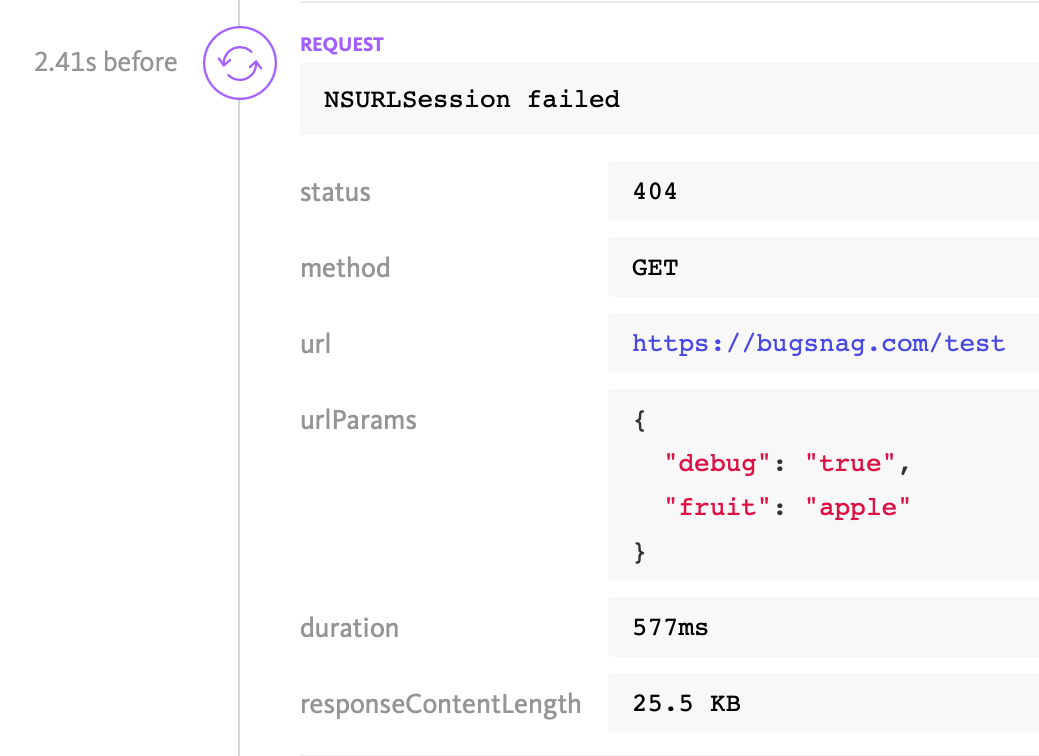
The breadcrumbs and events contain detailed metadata about each request, including the URL, HTTP method, response status code and duration:
Installation
To capture network breadcrumbs, install the BugsnagNetworkRequestPlugin plugin then enable it in configuration:
CocoaPods installation
Add the BugsnagNetworkRequestPlugin plugin’s pod to your Podfile:
pod 'BugsnagNetworkRequestPlugin'
Don’t forget to run pod install after updating your Podfile.
Swift Package Manager installation
In your Project Navigator, add BugsnagNetworkRequestPlugin.framework to the Frameworks, Libraries and Embedded Content section of your app’s target.
Carthage installation
Run Carthage to generate the framework to add to your project:
carthage update --use-xcframeworks --platform ios
Drag BugsnagNetworkRequestPlugin.framework from Carthage/Build to your project.
Manual installation
Select your project in the Project Navigator, then add BugsnagNetworkRequestPlugin.framework to the Frameworks, Libraries and Embedded Content section of your app’s target.
Basic configuration
Once the plugin is installed, configure BugSnag to start with a BugsnagNetworkRequestPlugin:
#import <BugsnagNetworkRequestPlugin/BugsnagNetworkRequestPlugin.h>
#import <BugsnagNetworkRequestPlugin/BugsnagNetworkRequestFailuresConfiguration.h>

BugsnagConfiguration *config = [BugsnagConfiguration loadConfig];
BugsnagNetworkRequestFailuresConfiguration *pluginConfig =
    [BugsnagNetworkRequestFailuresConfiguration new];
[pluginConfig addHttpErrorCodes:@[@400, @599]];
BugsnagNetworkRequestPlugin *plugin =
    [BugsnagNetworkRequestPlugin initWithConfiguration:pluginConfig
                                 enableNetworkBreadcrumbs:YES];
[config addPlugin:plugin];
[Bugsnag startWithConfiguration:config];
import BugsnagNetworkRequestFailuresConfiguration
import BugsnagNetworkRequestPlugin

let config = BugsnagConfiguration.loadConfig()
let pluginConfig = BugsnagNetworkRequestFailuresConfiguration()
pluginConfig.addHttpErrorCodes([400, 599])
let plugin = BugsnagNetworkRequestPlugin.initWithConfiguration(
    configuration: pluginConfig,
    enableNetworkBreadcrumbs: true
)
config.add(plugin)
Bugsnag.start(with: config)
By default, the plugin will log all requests as breadcrumbs, including failed requests (such as connectivity errors), but will only report errors if status codes are configured.
Controlling captured data
The plugin captures request and response header data including URLs, headers and status codes.
Headers and query string parameters are captured as maps of key-value pairs and will be redacted according to the redactedKeys configuration option.
We recommend adding Cookie and Authorization to the redactedKeys list to avoid capturing sensitive authentication data.
It is also possible to capture the request body for text-based payloads, although this is not enabled by default to avoid potential size and confidentiality issues. See the Advanced configuration section below for details.
The plugin also exposes a callback for the response, so that you can modify the data captured before it is sent. These callbacks can be used to redact further sensitive information from the payload or transform the URL for grouping purposes. They also allow per-request control of whether breadcrumbs or error events are sent by setting the isBreadcrumbReported flag:
BugsnagNetworkRequestFailuresConfiguration *pluginConfig =
    [BugsnagNetworkRequestFailuresConfiguration new];
[pluginConfig addResponseCallback:^(
    BugsnagInstrumentedHTTPResponse * _Nonnull instrumentedResponse) {
    NSString *reportedUrl =
        [instrumentedResponse.relatedRequest getReportedUrl];
    if (reportedUrl != nil &&
        [reportedUrl hasPrefix:@"http://example.domain.com"]) {
        [instrumentedResponse setBreadcrumbReported:YES];
        [instrumentedResponse.relatedRequest
            setReportedUrl:@"http://example.domain.com/REDACTED"];
    }
}];
let pluginConfig = BugsnagNetworkRequestFailuresConfiguration()
pluginConfig.addResponseCallback({ (instrumentedResponse) in
    let reportedUrl = instrumentedResponse.relatedRequest?.getReportedUrl()
    if reportedUrl != nil && reportedUrl!.hasPrefix(
        "http://example.domain.com"
    ) {
        instrumentedResponse.setBreadcrumbReported(true)
        instrumentedResponse.relatedRequest?.setReportedUrl(
            "http://example.domain.com/REDACTED"
        )
    }
})
The response object also contains a callback for fine-tuning the reported event, if there is one, with an BugsnagOnErrorBlock. In particular this allows you to add custom metadata or modify the severity of the event.
Advanced configuration
The BugsnagNetworkRequestFailuresConfiguration class provides several fields to customize its behavior:
Reporting failed requests
To report failed requests as error events, provide configuration with one or more HTTP status codes using addHttpErrorCode or addHttpErrorCodes:
BugsnagNetworkRequestFailuresConfiguration *pluginConfig =
    [BugsnagNetworkRequestFailuresConfiguration new];
[pluginConfig addHttpErrorCode:404];
[pluginConfig addHttpErrorCodes:@[@400, @401, @403, @444]]; // or as an array
[pluginConfig addHttpErrorCodes:500 high:509]; // or as a range from low to high (inclusive)
import BugsnagNetworkRequestFailuresConfiguration
import BugsnagNetworkRequestPlugin

let pluginConfig = BugsnagNetworkRequestFailuresConfiguration()
pluginConfig.addHttpErrorCode(404)
pluginConfig.addHttpErrorCodes(500, high: 509) // or a range from low to high (inclusive)
pluginConfig.addHttpErrorCodes([400, 401, 403, 444]) // or as an array
Capturing request body
To capture request body, set maxRequestBodyCapture with a maximum size in bytes:
BugsnagNetworkRequestFailuresConfiguration *pluginConfig =
    [BugsnagNetworkRequestFailuresConfiguration new];
pluginConfig.maxRequestBodyCapture = 1024;
let pluginConfig = BugsnagNetworkRequestFailuresConfiguration()
pluginConfig.maxRequestBodyCapture = 1024
Bodies larger than this size will be truncated.